Search Patient EU: Difference between revisions
(Created page with "<gallery widths="500px" heights="230px"> File:NCPeH_HomePage_EU.png | Figure 2.1: NCPeH Platform Home Page. Select "European Citizen" to search patient at European level. </...") |
No edit summary |
||
| (5 intermediate revisions by 2 users not shown) | |||
| Line 1: | Line 1: | ||
When a physician logs into the NCPeH application, they select the cross-border functionality on the platform, indicating that they will operate as an NCPB. The physician selects the patient’s country of origin and submits a request to retrieve the Patient Summary of an EU citizen/patient, after identifying the patient based on the identification document valid in the country of residence and entering the patient's unique identifiers, as defined by each Member State for NCP purposes. | |||
Through the cross-border gateway of the NCPeH CY, the request is forwarded to the corresponding system of the patient’s country of origin and insurance, from which the Patient Summary (PSB) is retrieved in both XML and PDF formats. The PSB files are transferred to the physician's computer without being stored on the central infrastructure of the eHealth Authority. The physician does not have the ability to edit the patient’s data; they are accessible for viewing purposes only, strictly for the provision of cross-border healthcare (eHealth Services). | |||
The pharmacist logs into the Cross-Border eHealth system and proceeds with identification and authentication when prompted. Then, by selecting the service "Cross-Border ePrescription Dispensation" (eDispensation – eD), they choose the relevant NCP of the corresponding Member State, enter the required patient details as specified by that Member State, and proceed to dispense the prescription. The dispensation record is transmitted via the Cross-Border portal of NCPeH CY to the respective National Contact Point of the patient’s Member State of affiliation. | |||
<gallery widths="500px" heights="230px"> | <gallery widths="500px" heights="230px"> | ||
File:NCPeH_HomePage_EU.png | Figure 2.1: NCPeH Platform Home Page. Select "European Citizen" to search patient at European level. | File: NCPeH_HomePage_EU.png | Figure 2.1: NCPeH Platform Home Page. Select "European Citizen" to search patient at European level. | ||
</gallery> | </gallery> | ||
<gallery widths="500px" heights="170px"> | |||
File: Select_Country_Patient.png | Figure 2.1: Select the Country of the Patient. | |||
File: Greece_Patient_Data.png | Figure 2.1: Greek Patient Data Access. | |||
</gallery> | |||
Each member state of the European Union determines its methods for identifying its citizens. They may have one or more identification methods. For example, if the Greek flag is selected, it indicates that you are serving a Greek citizen, who is identified by their National Security Number. | |||
Latest revision as of 10:53, 24 July 2025
When a physician logs into the NCPeH application, they select the cross-border functionality on the platform, indicating that they will operate as an NCPB. The physician selects the patient’s country of origin and submits a request to retrieve the Patient Summary of an EU citizen/patient, after identifying the patient based on the identification document valid in the country of residence and entering the patient's unique identifiers, as defined by each Member State for NCP purposes.
Through the cross-border gateway of the NCPeH CY, the request is forwarded to the corresponding system of the patient’s country of origin and insurance, from which the Patient Summary (PSB) is retrieved in both XML and PDF formats. The PSB files are transferred to the physician's computer without being stored on the central infrastructure of the eHealth Authority. The physician does not have the ability to edit the patient’s data; they are accessible for viewing purposes only, strictly for the provision of cross-border healthcare (eHealth Services).
The pharmacist logs into the Cross-Border eHealth system and proceeds with identification and authentication when prompted. Then, by selecting the service "Cross-Border ePrescription Dispensation" (eDispensation – eD), they choose the relevant NCP of the corresponding Member State, enter the required patient details as specified by that Member State, and proceed to dispense the prescription. The dispensation record is transmitted via the Cross-Border portal of NCPeH CY to the respective National Contact Point of the patient’s Member State of affiliation.
-
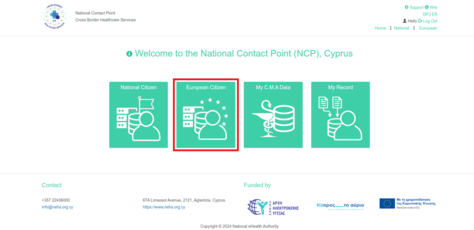
Figure 2.1: NCPeH Platform Home Page. Select "European Citizen" to search patient at European level.

-
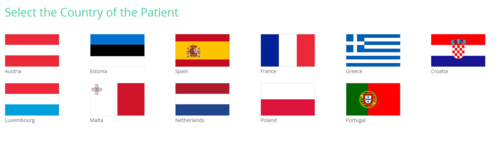
Figure 2.1: Select the Country of the Patient.
-
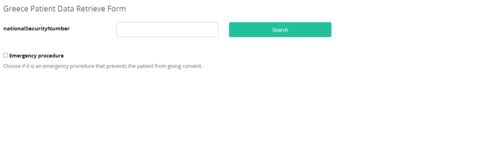
Figure 2.1: Greek Patient Data Access.


Each member state of the European Union determines its methods for identifying its citizens. They may have one or more identification methods. For example, if the Greek flag is selected, it indicates that you are serving a Greek citizen, who is identified by their National Security Number.