Search Patient: Difference between revisions
No edit summary |
Mchris44ucy (talk | contribs) No edit summary |
||
| (25 intermediate revisions by 5 users not shown) | |||
| Line 1: | Line 1: | ||
<gallery widths="400px" heights="300px"> | |||
File: Home Page Select National (EN).png | Figure 5.0: National Contact Point Portal – Home Page. Select “National Citizen” to perform a patient search at the national level. | |||
</gallery> | |||
==Provision of Electronic Cross-Border Health Services for New Users== | |||
In order for a healthcare professional to create, for the first time, the Patient Summary of a Cypriot citizen or to proceed with the issuance of an Electronic Prescription, the professional shall record in the system the patient’s basic demographic information, the designated emergency contact, and the patient’s mobile telephone number. | |||
Thereafter, a unique One-Time Password (OTP) shall be issued to the patient, who shall provide it to the healthcare professional. The provision of the OTP shall be deemed to constitute the patient’s explicit consent to proceed with the creation of the Patient Summary or the issuance of an Electronic Prescription. | |||
<gallery widths="500px" heights="150px"> | |||
File: New User Demographics (EN).png | Figure 5.1: First Entry of Citizen Data for Patient Summary Creation or Electronic Prescription Issuance. | |||
File: Search Patient - 2 (EN).PNG | Figure 5.2: Searching for a patient requires the physician or pharmacist to input the identity card number and date of birth. | |||
File: Search Patient - 3 (EN).PNG | Figure 5.3: Input of the One-Time Password (OTP) sent to the citizen’s registered contact number by the healthcare professional during data entry. | |||
</gallery> | |||
Once a | ==Provision of Electronic Cross-Border Health Services for Existing Users== | ||
The healthcare professional is not required to re-enter the patient’s demographic or other personal information. Instead, the patient may be located in the system by using their identity card details or ARC number, along with their date of birth. | |||
Once the patient has been identified, the healthcare professional may proceed directly with the updating and/or revision of the Patient Summary, as well as the issuance of an Electronic Prescription. | |||
<gallery widths="500px" heights="150px"> | |||
File: Search Patient - 2 (EN).PNG | Figure 5.4: Searching for a patient requires the physician or pharmacist to input the identity card number and date of birth. | |||
File: Search Patient - 3 (EN).PNG | Figure 5.5: Input of the One-Time Password (OTP) sent to the citizen’s registered contact number by the healthcare professional during data entry. | |||
</gallery> | |||
[[National Citizen | Back]] | |||
Latest revision as of 08:38, 7 October 2025
-
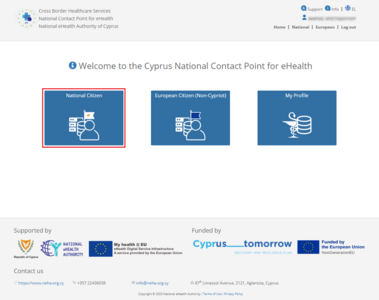
Figure 5.0: National Contact Point Portal – Home Page. Select “National Citizen” to perform a patient search at the national level.
.png)
Provision of Electronic Cross-Border Health Services for New Users
In order for a healthcare professional to create, for the first time, the Patient Summary of a Cypriot citizen or to proceed with the issuance of an Electronic Prescription, the professional shall record in the system the patient’s basic demographic information, the designated emergency contact, and the patient’s mobile telephone number.
Thereafter, a unique One-Time Password (OTP) shall be issued to the patient, who shall provide it to the healthcare professional. The provision of the OTP shall be deemed to constitute the patient’s explicit consent to proceed with the creation of the Patient Summary or the issuance of an Electronic Prescription.
-
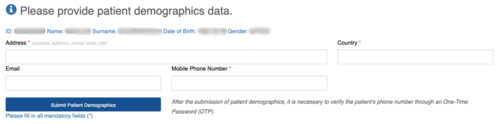
Figure 5.1: First Entry of Citizen Data for Patient Summary Creation or Electronic Prescription Issuance.
-

Figure 5.2: Searching for a patient requires the physician or pharmacist to input the identity card number and date of birth.
-

Figure 5.3: Input of the One-Time Password (OTP) sent to the citizen’s registered contact number by the healthcare professional during data entry.
.png)
.PNG)
.PNG)
Provision of Electronic Cross-Border Health Services for Existing Users
The healthcare professional is not required to re-enter the patient’s demographic or other personal information. Instead, the patient may be located in the system by using their identity card details or ARC number, along with their date of birth.
Once the patient has been identified, the healthcare professional may proceed directly with the updating and/or revision of the Patient Summary, as well as the issuance of an Electronic Prescription.
-
Figure 5.4: Searching for a patient requires the physician or pharmacist to input the identity card number and date of birth.
-
Figure 5.5: Input of the One-Time Password (OTP) sent to the citizen’s registered contact number by the healthcare professional during data entry.