Create / Edit Patient Summary: Difference between revisions
Jump to navigation
Jump to search
Mchris44ucy (talk | contribs) (Created page with "__NOTOC__ <gallery widths="500px" heights="300px"> File: Patient Menu - Select PS (EN).png | Figure 6.6: Selecting the Patient Summary. File:Create PS - Select (EN).png | Figure 6.7: Editing the Patient Summary Health Record. File:Create new PS version - Consent (EN).png | Figure 6.8: Physician’s Declaration of Acceptance for the Legal Issuance of the Patient Summary Health Record. </gallery> ==Patient Summary (PS-A)== *Create / Edit Patient Data | Create / E...") |
Mchris44ucy (talk | contribs) No edit summary |
||
| Line 26: | Line 26: | ||
<gallery widths="500px" heights="300px"> | <gallery widths="500px" heights="300px"> | ||
File: PS select delete ( | File:PS select delete (EN-Edit).png | Figure 6.13: Selecting “Delete” to Remove the New Version. | ||
File: PS - Delete ( | File:PS - Delete (EN-Modal).png | Figure 6.14: Confirmation of the “Delete” Action. | ||
</gallery> | </gallery> | ||
[[Patient Menu | Back]] | [[Patient Menu | Back]] | ||
Latest revision as of 13:26, 8 October 2025
-

Figure 6.6: Selecting the Patient Summary.
-
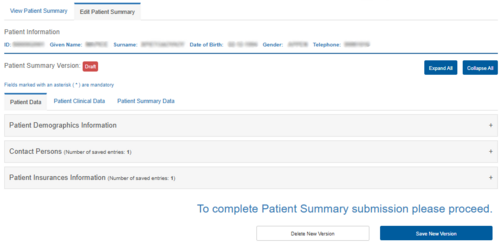
Figure 6.7: Editing the Patient Summary Health Record.
-

Figure 6.8: Physician’s Declaration of Acceptance for the Legal Issuance of the Patient Summary Health Record.
.png)
.png)
.png)
Patient Summary (PS-A)
Saving or Deleting a New Version of the Patient Summary Health Record
Saving a New Version of the Patient Summary Health Record
To save the data of the new version of the Patient Summary Health Record, select the “Save” button. Upon displaying the confirmation message, the Patient Summary Health Record is successfully updated.
-
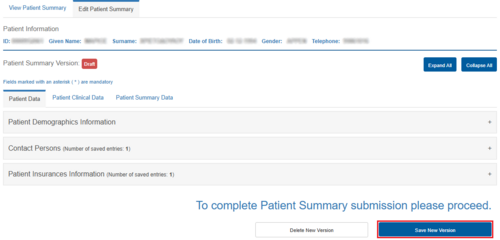
Figure 6.11: Saving a Version of the Patient Summary Health Record.
-
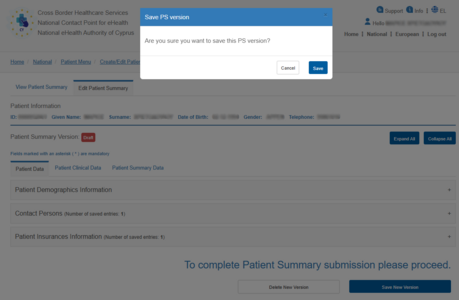
Figure 6.12: Confirmation of the “Save” Action.
.png)
.png)
Deleting a New Version of the Patient Summary Health Record
-
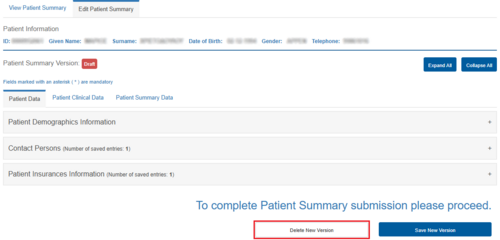
Figure 6.13: Selecting “Delete” to Remove the New Version.
-
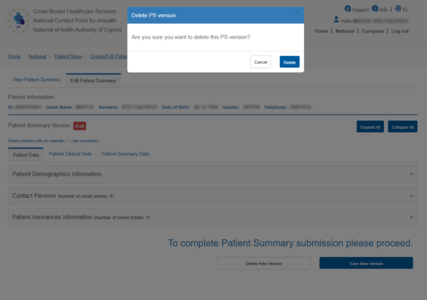
Figure 6.14: Confirmation of the “Delete” Action.
.png)
.png)