Preview Original Clinical Document: Difference between revisions
Mchris44ucy (talk | contribs) (Created page with "<gallery widths="600px" heights="200px"> File:Patient Menu Select OrCD (EN).png | Figure 6.1: Selecting the Original Clinical Document. File: Preview PS - Select (EN).png | Figure 6.2: Patient Summary Preview. </gallery> ==Patient Summary (PS-A)== * Patient Data * Patient Clinical Data * Patient Summary Data Back") |
Mchris44ucy (talk | contribs) No edit summary |
||
| (17 intermediate revisions by the same user not shown) | |||
| Line 1: | Line 1: | ||
__NOTOC__ | |||
<gallery widths="600px" heights="200px"> | <gallery widths="600px" heights="200px"> | ||
File:Patient Menu Select OrCD (EN).png | Figure 6. | File:Patient Menu Select OrCD (EN).png | Figure 6.8.0: Selecting the Original Clinical Document. | ||
File: Preview | File:Preview OrCD General Screen (EN).png | Figure 6.8.1: Preview Original Clinical Document. | ||
</gallery> | </gallery> | ||
== | ==Laboratory Results Reports== | ||
By selecting the "Preview" button, the user can view the Original Clinical Document (OrCD) in PDF format. The document can either be reviewed directly within the system or downloaded for offline access. | |||
<gallery widths="500px" heights="250px"> | |||
File:Preview OrCD General Screen LRR (EN).png | Figure 6.8.2: Original Clinical Document Preview - '''Laboratory Results Reports'''. | |||
File:Preview OrCD LRR Table.png | Figure 6.8.3: Laboratory Results Reports Overview. | |||
</gallery> | |||
==Hospital Discharge Reports== | |||
By selecting the "Preview" button, the user can view the Original Clinical Document (OrCD) in PDF format. The document can either be reviewed directly within the system or downloaded for offline access. | |||
<gallery widths="500px" heights="250px"> | |||
File:Preview OrCD General Screen HDR (EN).png | Original Clinical Document Preview - '''Hospital Discharge Reports'''. | |||
File:Preview OrCD HDR Table.png | Figure 6.8.5: Hospital Discharge Reports Overview. | |||
</gallery> | |||
==Medical Imaging Reports== | |||
By selecting the "Preview" button, the user can view the Original Clinical Document (OrCD) in PDF format. The document can either be reviewed directly within the system or downloaded for offline access. | |||
<gallery widths="500px" heights="250px"> | |||
File:Preview OrCD General Screen MIR (EN).png | Figure 6.8.6: Original Clinical Document Preview - '''Medical Imaging Reports'''. | |||
File:Preview OrCD MIR Table.png | Figure 6.8.7: Medical Imaging Reports Overview. | |||
</gallery> | |||
==Medical Images== | |||
By selecting the "Preview" button, the user can view the Original Clinical Document (OrCD) in PDF format. The document can either be reviewed directly within the system or downloaded for offline access. | |||
<gallery widths="500px" heights="250px"> | |||
File:Preview OrCD General Screen MI (EN).png | Figure 6.8.8: Original Clinical Document Preview - '''Medical Images'''. | |||
File:Preview OrCD MI Table.png | Figure 6.8.9: Medical Images Overview. | |||
</gallery> | |||
[[Patient Menu | Back]] | [[Patient Menu | Back]] | ||
Latest revision as of 05:29, 23 June 2026
-
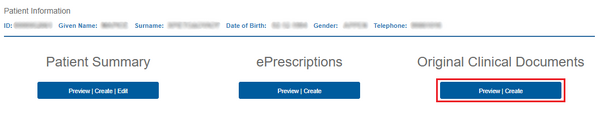
Figure 6.8.0: Selecting the Original Clinical Document.
-
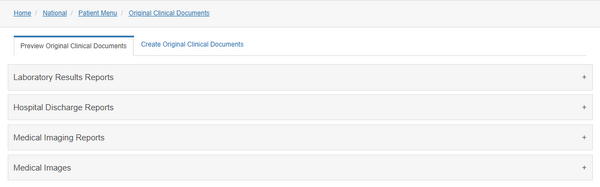
Figure 6.8.1: Preview Original Clinical Document.
.png)
.png)
Laboratory Results Reports
By selecting the "Preview" button, the user can view the Original Clinical Document (OrCD) in PDF format. The document can either be reviewed directly within the system or downloaded for offline access.
-
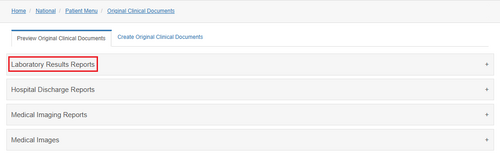
Figure 6.8.2: Original Clinical Document Preview - Laboratory Results Reports.
-
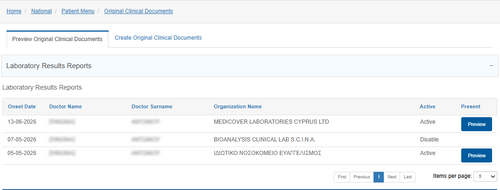
Figure 6.8.3: Laboratory Results Reports Overview.
.png)

Hospital Discharge Reports
By selecting the "Preview" button, the user can view the Original Clinical Document (OrCD) in PDF format. The document can either be reviewed directly within the system or downloaded for offline access.
-
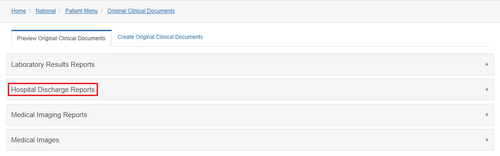
Original Clinical Document Preview - Hospital Discharge Reports.
-
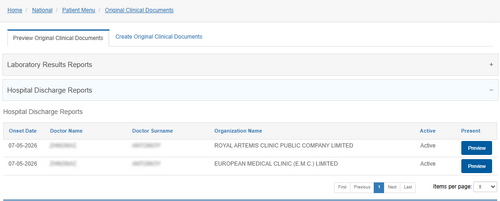
Figure 6.8.5: Hospital Discharge Reports Overview.
.png)

Medical Imaging Reports
By selecting the "Preview" button, the user can view the Original Clinical Document (OrCD) in PDF format. The document can either be reviewed directly within the system or downloaded for offline access.
-
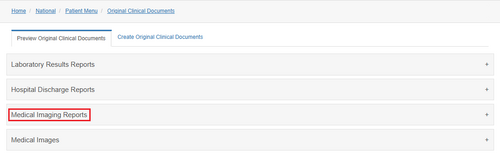
Figure 6.8.6: Original Clinical Document Preview - Medical Imaging Reports.
-
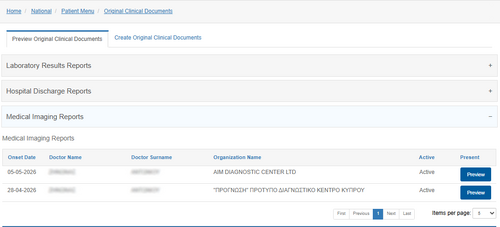
Figure 6.8.7: Medical Imaging Reports Overview.
.png)

Medical Images
By selecting the "Preview" button, the user can view the Original Clinical Document (OrCD) in PDF format. The document can either be reviewed directly within the system or downloaded for offline access.
-
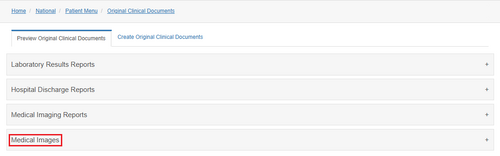
Figure 6.8.8: Original Clinical Document Preview - Medical Images.
-
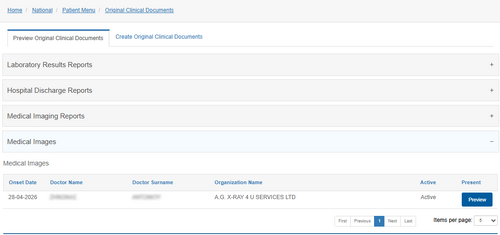
Figure 6.8.9: Medical Images Overview.
.png)
