Create / Edit Patient Data: Difference between revisions
Jump to navigation
Jump to search
Mchris44ucy (talk | contribs) (Created page with "<gallery widths="500px" heights="300px"> File: Patient Data Generic (EL-Edit).png | Figure 6.9.0: Selecting the “Create/Edit” Action for the Patient Summary. </gallery> ==Patient Demographic Information== <gallery widths="500px" heights="300px"> File: Patient Demographics (EL-Edit).png | Figure 6.9.1: Entering Patient Demographic Information. </gallery> ==Contact Persons== <gallery widths="500px" heights="300px"> File: Contact Persons (EL-Edit).png | Figu...") |
Mchris44ucy (talk | contribs) No edit summary |
||
| Line 1: | Line 1: | ||
<gallery widths="500px" heights="300px"> | <gallery widths="500px" heights="300px"> | ||
File: Patient Data Generic ( | File:Patient Data Generic (EN-Edit).png | Figure 6.9.0: Selecting the “Create/Edit” Action for the Patient Summary. | ||
</gallery> | </gallery> | ||
| Line 7: | Line 6: | ||
<gallery widths="500px" heights="300px"> | <gallery widths="500px" heights="300px"> | ||
File: Patient Demographics ( | File:Patient Demographics Information (EN-Edit).png | Figure 6.9.1: Entering Patient Demographic Information. | ||
</gallery> | </gallery> | ||
| Line 13: | Line 12: | ||
<gallery widths="500px" heights="300px"> | <gallery widths="500px" heights="300px"> | ||
File: Contact Persons ( | File:Contact Persons (EN-Edit).png | Figure 6.9.2: Adding Emergency Contacts. | ||
File: Contact Persons ( | File:Contact Persons (EN-Modal).png | Figure 6.9.3: Entering Contact Information for an Emergency Contact. | ||
</gallery> | </gallery> | ||
| Line 20: | Line 19: | ||
<gallery widths="500px" heights="300px"> | <gallery widths="500px" heights="300px"> | ||
File: Patient | File:Patient Insurances Information (EN-Edit).png | Figure 6.9.4: Adding Patient Insurance Information. | ||
File: Patient Insurance (EL-Modal).png | Figure 6.9.5: Entering Patient Insurance Information. | File: Patient Insurance (EL-Modal).png | Figure 6.9.5: Entering Patient Insurance Information. | ||
</gallery> | </gallery> | ||
[[Create / Edit Patient Summary | Back ]] | [[Create / Edit Patient Summary | Back ]] | ||
Revision as of 13:43, 8 October 2025
-
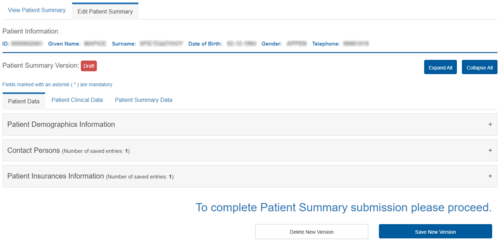
Figure 6.9.0: Selecting the “Create/Edit” Action for the Patient Summary.
.png)
Patient Demographic Information
-
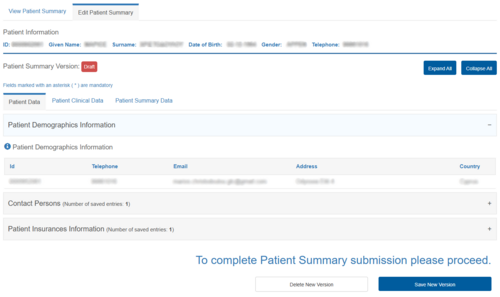
Figure 6.9.1: Entering Patient Demographic Information.
.png)
Contact Persons
-
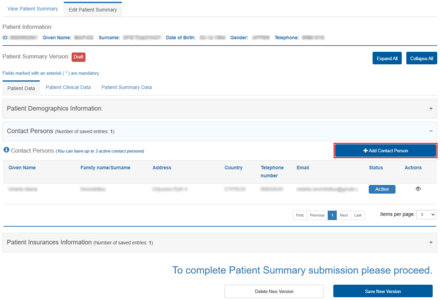
Figure 6.9.2: Adding Emergency Contacts.
-
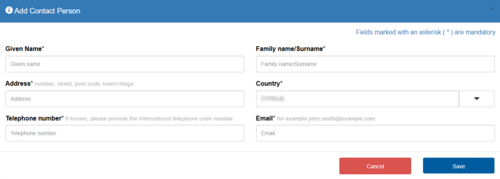
Figure 6.9.3: Entering Contact Information for an Emergency Contact.
.png)
.png)
Patient Insurance Information
-
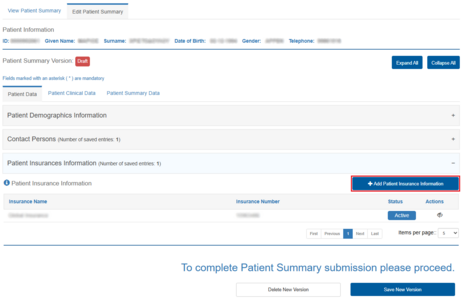
Figure 6.9.4: Adding Patient Insurance Information.
-
Figure 6.9.5: Entering Patient Insurance Information.
.png)
.png)